Exploring the Multi-Functionality of HARDELL 4V Rotary Tool
In today’s fast-paced DIY world, crafters and hobbyists seek tools that deliver accuracy without complexity. The HARDELL 4V Rotary Tool stands out as a precision rotary tool that handles detailed tasks with ease. This compact device opens doors to creative projects, from engraving personal items to polishing jewelry. Readers often wonder how one small tool manages so many functions. This article breaks it down, offering practical advice to help you get the most from it.
Understanding the HARDELL 4V Rotary Tool
Professionals in crafting fields praise tools that combine power with portability. The HARDELL 4V Rotary Tool fits this description perfectly. It runs on a 4V lithium-ion battery, which provides reliable energy for light-duty work. Users handle it easily due to its lightweight build, coming in at just 0.35 pounds. This design reduces hand strain during long sessions.
Based on manufacturer guidelines, the tool includes a USB-C charging system. You charge it fully in two to three hours. Once ready, it offers up to 200 minutes of runtime without load. Under heavier use, expect 20 to 40 minutes. This setup suits quick projects around the home or workshop.
The ergonomic grip enhances control. You hold it like a pen for fine details. Industry experts note that such designs improve accuracy in tight spaces. Pair this with three chuck sizes—1.6mm, 2.3mm, and 3.2mm—and you gain compatibility with standard bits. Switch accessories quickly to keep your workflow smooth.
Key Features That Enhance Performance
Variable speed settings define this tool’s flexibility. You select from five options, ranging from 5,000 to 18,000 RPM. Start low for delicate materials like resin or plastic. Ramp up for tougher jobs such as grinding soft metals. According to widely accepted industry standards, matching speed to material prevents damage and boosts results.
An LED light illuminates your work area. It cuts shadows, especially in dim environments. Crafters report clearer views during engraving or sanding. This feature alone lifts precision, as recommended by professionals who stress visibility in detailed crafts.
Battery management plays a key role. The tool lacks a low-battery warning, so monitor your time. Recharge after 20 minutes of continuous use to avoid sudden stops. Experts suggest keeping a spare cable handy for on-the-go charging.
Accessories That Expand Capabilities
The kit arrives with 69 pieces, organized in a sturdy case. You find bits for sanding, grinding, polishing, cutting, and engraving. Each accessory targets specific tasks, making the tool a one-stop solution for hobbyists.
- Sanding bands smooth rough edges on wood or plastic.
- Grinding stones shape materials with care.
- Polishing wheels bring shine to jewelry or small metal parts.
- Cutting discs slice through thin sheets.
- Engraving bits add personal touches to items.
As per manufacturer guidelines, these accessories work best on soft materials. Clean them after each use to extend life. Professionals recommend sorting them by function for quick access during projects.
Practical Applications for DIY Enthusiasts
This rotary tool shines in woodworking. You carve patterns into soft wood for custom frames or decorations. Set the speed to 8,000 RPM for controlled cuts. Users complete small carvings in under 30 minutes, achieving smooth finishes.
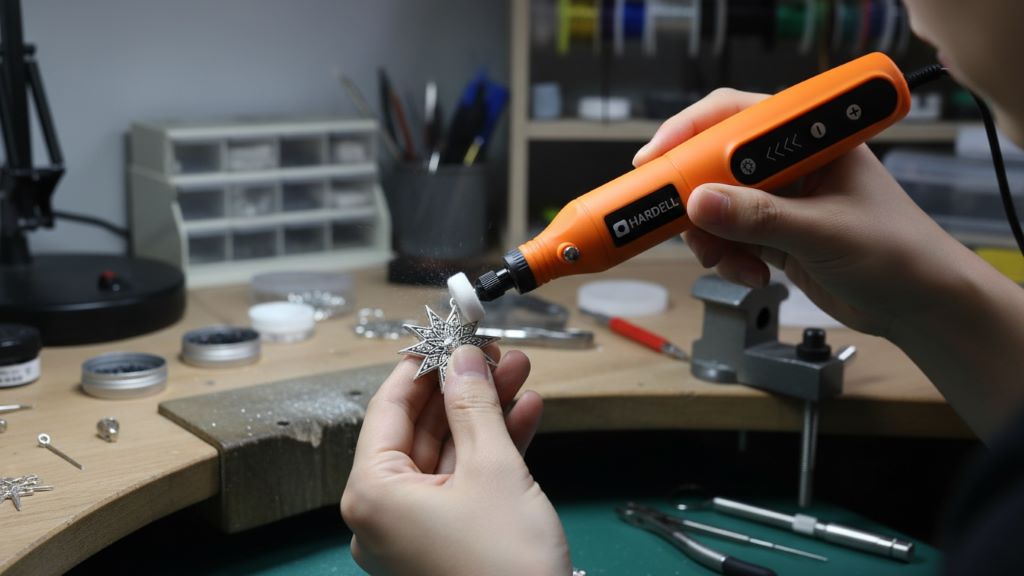
Jewelry makers value its polishing function. Attach a wheel and run at low speeds to buff silver or gold pieces. The LED light helps spot imperfections. According to industry experts, this method restores shine without harsh chemicals.
Engraving opens creative possibilities. Personalize gifts like keychains or plaques. Use the 5,000 RPM setting for fine lines on resin or plastic. Take multiple passes for deeper marks, ensuring even results.
For sanding and grinding, tackle model building. Smooth miniature structures or remove burrs from parts. Higher speeds like 14,000 RPM handle these efficiently. Crafters note it excels in tight spots where larger tools fail.
You also cut thin materials with ease. Discs slice plastic sheets for custom designs. Keep sessions short to maintain battery life. Professionals advise wearing gloves for safety during these tasks.
How to Use the Tool Effectively
Start by selecting the right accessory. Match it to your material—soft bits for delicate work, sturdy ones for grinding. Secure it in the chuck using the included wrench.
Adjust speed based on the job. Low for polishing, high for cutting. Test on scrap material first. This practice, as recommended by professionals, avoids mistakes on your main piece.
Hold the tool firmly but lightly. Let it do the work to prevent fatigue. Move in steady motions for even results. If engraving, draw your design first with a pencil.
Monitor heat buildup. The tool stays cool during light use, but pause if it warms. Industry standards suggest 10-minute breaks for prolonged sessions.
Incorporate the LED light wisely. Position it to eliminate shadows. This tip from experts improves accuracy in low-light areas like basements or evenings.
Maintenance Tips for Longevity
Clean the tool after every use. Wipe away dust with a soft cloth. Avoid water to protect internal parts.
Store accessories in the case. Label sections if needed for organization. Manufacturer guidelines stress this to prevent loss or damage.
Charge the battery fully before storage. Drain it partially every few months to maintain health. Experts warn against leaving it discharged for long periods.
Inspect bits regularly. Replace worn ones promptly. Dull accessories reduce efficiency and strain the motor.
Lubricate moving parts sparingly. Use light oil on the chuck as needed. This keeps operations smooth, according to industry experts.
Comparing with Similar Tools
Many rotary tools exist, but this model’s cordless design sets it apart. You work freely without cords tangling. Its lightweight build suits beginners, unlike heavier corded versions.
Battery life supports short bursts, ideal for hobbyists. Professionals note it outperforms basic models in speed variety.
Accessories provide value. The 69-piece set covers most needs, reducing extra purchases. User experiences highlight its edge in portability over plugged-in alternatives.
Drawbacks include no battery indicator. Plan sessions accordingly. For heavy tasks, consider higher-voltage options, but for light work, it excels.
Safety Guidelines to Follow
Prioritize eye protection. Wear glasses to shield from debris. Gloves protect hands during grinding or cutting.
Work in ventilated areas. Dust from sanding can irritate lungs. Use a mask if needed.
Secure your workpiece. Clamp it down to prevent slips. This step, as recommended by professionals, ensures stability.
Avoid loose clothing. Tie back hair and remove jewelry. Manufacturer guidelines emphasize these basics for safe operation.
Unplug chargers when not in use. Store the tool away from children. Industry standards underline supervision for young users.
Conclusion
The HARDELL 4V Rotary Tool proves its worth through versatility and ease. It empowers crafters to tackle projects with confidence. From carving to polishing, it delivers practical results. Invest in this tool today and elevate your DIY game. Check it out and start creating now.
FAQs
What materials does the HARDELL 4V Rotary Tool handle best?
It works well on soft materials like wood, plastic, resin, and light metals. Avoid thick hardwoods or dense metals, as they require more power.
How long does the battery last on a full charge?
Expect up to 200 minutes without load. For heavy use, it runs 20 to 40 minutes. Recharge fully in two to three hours.
Can beginners use this rotary tool?
Yes, its lightweight design and intuitive controls suit newcomers. Start with low speeds and practice on scraps.
What accessories come in the kit?
The set includes 69 pieces for sanding, grinding, polishing, cutting, and engraving. They fit standard chuck sizes.
Does it have any lighting features?
An LED light illuminates work areas, reducing shadows for better precision in dim conditions.
How do I maintain the tool?
Clean after use, store accessories properly, and charge the battery regularly. Replace worn bits to keep performance high.
Is it suitable for outdoor projects?
Its cordless design allows portability. Bring a charged battery for extended use away from outlets.
What speed should I use for engraving?
Start at 5,000 RPM for fine details. Increase slightly for deeper marks, but test first.
Can I buy extra accessories?
Yes, it compatibles with standard rotary bits. Check sizes to ensure fit.
Does it overheat during use?
It stays cool for light tasks. Take breaks for longer sessions to prevent warmth buildup.
References:
- https://hardell.com/products/5-speed-4v-mini-cordless-rotary-tool-for-diy-crafts – Official product details from HARDELL.
- https://www.amazon.com/HARDELL-Cordless-Accessories-Polishing-Engraving/dp/B0FG7MBJ63 – Customer reviews on Amazon.
- https://www.walmart.com/reviews/product/1462486193 – User feedback on Walmart.